Picking a TrafficBotPro Alternative: CTR Manipulation Basics
You are paying a bot tool and still staring at a flat keyword graph. Some traffic bots send visits that never touch your page, and you only find out after the credits are gone.
This article breaks down what CTRTool actually does, how it differs from TrafficBotPro style tools, and which campaign types it covers across Google Search, Bing, Maps and AI Overviews. You will also see how screenshot proof, keyword position tracking and pay-for-results credits work, so you can decide whether it fits your setup.
What Is CTRTool? A CTR Campaign Tool Defined
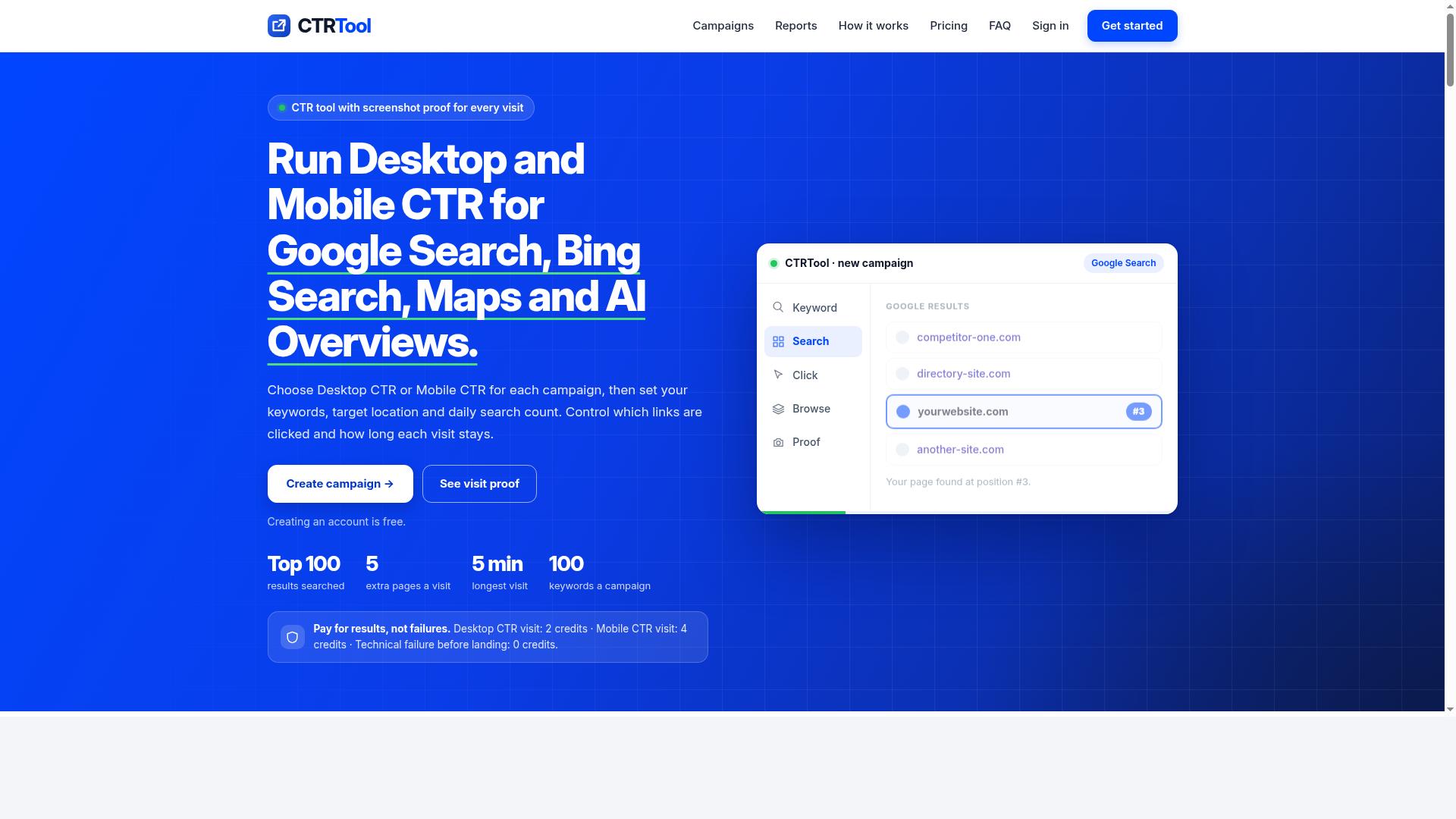
CTRTool is a SaaS platform that runs controlled CTR campaigns for Google Search, Bing Search, Google Maps, and AI Overviews, using real devices and proxies to simulate organic clicks on targeted keywords. In plain terms, it is automation software for click-through rate manipulation: it sends simulated organic visits to specific pages for chosen keywords.
The core mechanism is straightforward. A user picks a keyword, sets the target location and a daily search count, then chooses Desktop CTR or Mobile CTR for each campaign. CTRTool delivers visits that appear as organic search traffic rather than direct hits.
That SERP focus is what separates it from generic traffic bots. A basic bot may simply load a URL, while CTRTool targets search results pages so the visit resembles a real user arriving through a query. This matters because SERP behavior is the signal CTR manipulation aims to influence.
Users also control which links are clicked and how long each visit stays, which shapes session duration and dwell time within a campaign. Every visit is documented with a screenshot, giving a record of what was delivered. It is worth noting the site itself states that automated visits do not guarantee rankings, so the tool should be treated as a campaign instrument, not a promise of results.
For anyone weighing a TrafficBotPro alternative, this definition sets the baseline. CTRTool is a keyword-driven, geo-targeted click campaign tool with device selection and per-visit documentation, and later comparisons should be measured against those specific capabilities.
Is CTRTool a Legit TrafficBotPro Alternative for CTR Manipulation?
TrafficBotPro and CTRTool both promise to influence search rankings through simulated clicks, but they differ in transparency, proof mechanisms, and campaign targeting. Evaluating whether CTRTool is a legitimate alternative comes down to verifiable criteria rather than marketing language.
The first criterion is documentation. CTRTool provides screenshot proof for every visit, capturing both the search and the landing page. That means a user can open a report and see exactly what happened during a campaign, not just a traffic counter ticking upward.
The second criterion is targeting specificity. CTRTool builds campaigns around search results, covering Google Search, Bing Search, Maps, and AI Overviews. Public materials for TrafficBotPro emphasize generic traffic simulation, so the two tools are not solving the same problem in the same way.
The third criterion is campaign structure. CTRTool supports keyword and URL based campaigns with desktop or mobile CTR, country, state, and city targeting, and search depth up to 100. A tool that only sends raw visits offers no equivalent SERP context.
So "legit" depends on proof and targeting specificity. CTRTool discloses how visits are executed and documents each one, and that proof-based model is the real differentiator.
How CTRTool Approaches CTR Manipulation Differently
CTRTool differentiates itself by tying every simulated visit to a specific keyword, location, and device type, and by capturing screenshot evidence of the search and landing pages. A campaign is built around a keyword and a target URL, with the user choosing desktop or mobile CTR and optionally a country, state, and city.
Visits are then executed to mimic organic behavior. The session searches the keyword, clicks the result, and stays on the page for a set duration. Users can configure daily search counts with now, spread out, or gap timing, along with days, hours, and a time zone.
Consider a campaign for "emergency plumber Austin" with mobile CTR targeting Texas. Instead of firing anonymous hits at a URL, CTRTool runs searches for that phrase on mobile sessions matched to the target location, then records the path taken.
CTRTool also tracks keyword positions over time, including Search positions, Maps listing order, and AI citation order. That lets users correlate campaign activity with ranking changes instead of guessing whether a shift came from the campaign or from something else.
Tools that only send raw traffic without SERP context cannot make that connection. There is no keyword, no search result, and no position history to compare against. CTRTool's reports include full visit paths and keyword position tracking, which turns a campaign into something a user can actually evaluate.
Key Features and What Makes CTRTool Stand Out
CTRTool's feature set centers on four campaign types, screenshot-based proof, and position tracking that covers both traditional search results and newer surfaces like AI Overviews.
These three areas matter because they answer the questions buyers usually ask about any CTR manipulation tool: where can it send visits, can I verify those visits actually happened, and does it show me what changed in the rankings afterward.
The subsections below break down each feature area with specifics, from targeting rules per campaign type to what the proof images and position history actually contain.
Campaign Types: Google Search, Bing, Maps and AI Overviews
CTRTool supports four distinct campaign types: Google Search CTR, Bing Search CTR, Google Maps CTR, and AI Overview campaigns, each with its own targeting rules.
For Google Search and Bing Search campaigns, the target page must rank in the top 100 organic results for the chosen keyword and location. Users pick desktop or mobile devices and can optionally narrow by country, state, and city, or leave the setting on "Any country" to draw from a mix of supported locations.
Device choice matters beyond targeting. Desktop and mobile visits consume credits differently, so the device setting shapes both how a campaign looks in analytics and what it costs to run.
Maps campaigns work differently. Instead of a keyword result, the tool checks up to 50 listings (about five pages) to locate the business listing, then clicks through to its website link. City targeting keeps these visits tied to the right local market.
AI Overview campaigns require something specific: a matching AI Overview citation must be present for the keyword. The tool finds the website in the overview and clicks its source link, which addresses a surface most CTR tools do not touch at all.
Each campaign supports up to 100 keywords, and a single account can run up to 100 campaigns. All of this runs on one shared credit balance across campaign types, websites, and keywords.
Screenshot Proof and Full Visit Paths
Every CTRTool visit generates separate screenshot proof images for the search results page and the landing page, along with a full visit path that shows the sequence of actions taken.
This is the feature that separates CTRTool from tools reporting only aggregate traffic numbers. With a bare traffic count, there is no way to confirm a visit came from the intended keyword, location, or device. With per-visit proof, you can open any single visit and check it.
The proof set includes:
- A SERP screenshot showing the keyword and the clicked result
- A landing page screenshot as rendered during the visit
- A visit path log covering the search, the click, and time on page
Visits can run up to five minutes and include up to five additional internal pages, with configurable click order and scrolling time. That makes the recorded path a genuine walk through the site rather than a single bounce, and the log reflects it.
For agencies, this transparency is practical. Screenshots and path logs can support client reporting and build trust, since the evidence is per visit rather than a campaign summary. The same records help anyone auditing their own campaigns to spot settings that need adjustment.
Keyword Position Tracking Over Time
CTRTool tracks keyword positions over time, including organic search rankings, Google Maps listing order, and AI Overview citation order, so users can see how rankings shift during and after campaigns.
For each campaign keyword, the tool records where the page sits in Google or Bing organic results, the order in which a Maps listing appears, and whether the page is cited in an AI Overview. These reports sit alongside the visit paths and screenshots from the same campaigns.
The historical view supports a measured approach. Users can compare ranking movement against when CTR activity ran, without assuming one caused the other, and use the pattern to decide whether to extend a campaign, adjust its targeting, or change the device mix. Research on behavioral signals suggests click-through rate can influence rankings, but position data is evidence of movement, not proof of cause.
Tracking is tied to the chosen keyword and location, so the history reflects the exact campaign context rather than a generic national ranking. That precision matters most for local Maps campaigns and for AI Overview citations, where results vary sharply by query and place.
Combined with the other two feature areas, this closes the loop: campaigns define where visits go, proof confirms they happened, and position tracking shows what followed.
Pricing and Plans
CTRTool uses a credit-based monthly subscription model, with plans priced in USD and credits consumed per visit depending on device type. That structure matters when you compare it to a TrafficBotPro alternative, because you are paying for delivered visits rather than raw bot traffic volume.
Every tier bundles a monthly credit allowance, and unused credits roll over while your subscription stays active. They expire once cancellation takes effect, so the value sits with continuous use.
Creating an account is free, and custom development is quoted as a separate one-time fee. The subsection below explains how credits map to actual visits and why failed attempts before landing are not charged.
Pay-for-Results Credits: No Charge for Pre-Landing Failures
CTRTool charges credits only for visits that reach the landing page; if a visit fails before landing, such as when the target page is not found in the top 100 results, no credits are deducted. This is the core of the pay-for-results design.
Credit costs differ by device. A desktop CTR visit costs 2 credits, while a mobile CTR visit costs 4 credits, so mobile traffic consumes twice the allowance. A verified search without a match costs 1 credit, and a technical failure before landing costs 0 credits.
Here is how the two smaller plans translate into visits:
- Starter at $59/month for 2,000 credits, up to 1,000 desktop CTR visits or 500 mobile CTR visits
- Growth at $125/month for 5,000 credits, up to 2,500 desktop CTR visits or 1,250 mobile CTR visits
Because mobile visits cost more credits than desktop, campaigns mixing device emulation should budget accordingly. The key advantage over raw bot traffic tools is that wasted spend drops: if a keyword is not ranking in the top 100, or a listing is not found in Maps, you are not billed for the attempt.
That alignment between cost and delivered visits is what separates a measured approach to CTR manipulation from simply pushing bot traffic at a page. You pay for outcomes that actually land, not for failed lookups.
Trust Signals: Transparency Over Hype
CTRTool's trust approach rests on verifiable proof, screenshots, visit paths, and position tracking, rather than vague claims about "organic" traffic. Instead of asking buyers to take a claim on faith, the platform shows what was executed and where. That distinction matters in a category where many tools lean on marketing language.
Transparency is not a nice-to-have here. CTR manipulation is a technique with real risks, and a tool that documents its own activity gives users something concrete to evaluate. Documented execution beats confident promises every time.
Three disclosure features carry most of the trust weight on CTRTool:
- Per-visit screenshot proof, so each visit can be checked rather than assumed
- Full visit paths, showing the route a session took rather than a single data point
- Historical position tracking, which records where a keyword stood over time
Together these shift the conversation from "trust us" to "check for yourself." A tool that obscures how traffic is generated, or offers only a summary total at the end, leaves users unable to verify much of anything. Summary statistics can look tidy while hiding the details that matter for judging SERP behavior and behavioral signals.
The site also publishes a legal notices page at ctrtool.com/licenses.html alongside its terms of use, and support is available by email. None of this is glamorous, but it is the kind of paperwork that signals a tool is comfortable being examined. Disclosure is a feature, especially in a niche where many products prefer to stay vague about mechanics.
It is worth being plain about the limits. CTR manipulation carries detection risk from search engines, and results are never guaranteed. CTRTool does not promise ranking improvements, and its value sits in documented execution rather than certainty of outcome. A tool that admits this is more credible than one that sells guaranteed gains.
For anyone weighing a TrafficBotPro alternative, that framing is the practical test. Ask whether the tool shows its work, publishes its terms, and keeps support reachable. CTRTool does all three, and it stops short of overstating what any CTR campaign can deliver. Legitimacy here means disclosure, not guarantees.
Who Should Use CTRTool
CTRTool is aimed at SEO practitioners and agencies who need to run and document CTR campaigns for their own sites or client properties across Google, Bing, Maps, and AI Overviews. It is not a general-purpose marketing suite. It is a focused CTR manipulation tool built for people who already understand how search results are structured and want a repeatable way to influence click-through rate and behavioral signals.
The ideal user is someone who treats CTR work as part of an organic SEO strategy rather than a standalone trick. That means knowing which keywords matter, where the site currently ranks, and what a realistic CTR curve looks like for that position. Without that context, any campaign is guesswork.
Three groups fit CTRTool best:
- SEO professionals who want to supplement organic SEO for specific keywords and observe how SERP behavior shifts over time.
- Agencies managing multiple clients that need to run campaigns across several properties and keep a record of what was executed for each one.
- Site owners testing CTR effects on their own rankings before committing to a broader strategy, including via tier links, PBNs, and test properties as the site's guidance mentions.
For agencies, the documentation angle matters as much as the campaign itself. Being able to show a client that a defined set of keywords received a defined campaign is proof of executed work, which is often harder to produce with ad hoc manual clicking or generic automation software.
Geo-targeting is another practical fit for local SEO work. A practitioner running campaigns for a business in a specific market can direct activity toward supported locations rather than treating the whole country as one audience. This helps when SERP behavior varies by region and the client's rankings differ between them.
CTRTool does require some SEO knowledge to use effectively. Users need to understand keyword targeting and ranking positions, because the value of a campaign depends on where the site actually sits in results. Someone with no grasp of search rankings will struggle to judge whether a campaign is working or to interpret changes in search engine rankings afterward.
It is also a global online service with no stated country restrictions, so users can target any supported location. That makes it suitable for practitioners working across borders or for agencies with clients in more than one market. The tool fits people who want a defined, observable campaign process, not those looking for a passive background service.
Final Verdict
CTRTool stands out as a CTR campaign tool that prioritizes documented execution over vague promises, making it a credible alternative to TrafficBotPro for SEOs who value proof. That distinction matters in a niche where many products describe outcomes but show little evidence of what actually ran.
The platform supports four campaign types, which gives users room to structure tests around different goals instead of forcing every campaign into one mold. Each campaign also comes with screenshot proof, so buyers can see evidence of execution rather than trusting a summary report alone.
Position tracking rounds out the picture. It lets users watch where a target keyword sits over time, which is the practical way to judge whether a campaign coincided with movement in search engine rankings. No tool can isolate its own effect from every other factor, but tracking at least keeps the question honest.
Pricing runs on a credit-based model, and pre-landing failures are not charged. That detail is worth weighing carefully. Failed attempts are a routine part of traffic simulation, and not billing for them removes a common source of friction between buyer and vendor.
It is fair to say CTRTool is not a magic bullet. Ranking effects depend on competition, on-page quality, site history, and how the ranking algorithm weighs behavioral signals in a given niche. Anyone expecting guaranteed movement from CTR manipulation alone is likely to be disappointed.
What CTRTool does offer is transparency that many competitors lack. Screenshot evidence, position tracking, and clear billing rules give users something concrete to evaluate. For readers comparing an alternative to TrafficBotPro, that proof-based approach is the key differentiator to weigh against feature lists and marketing claims.
A sensible next step is to review the official website directly, including the Support and Terms of use pages, before committing credits. Buyers with specific questions can reach support at vaibhav@autoblogging.ai to clarify details before starting a campaign.
Frequently Asked Questions
What should I look for in a TrafficBotPro alternative?
Focus on what you can verify: whether the tool supports the search engines and surfaces you actually target, whether it proves each visit happened, and how its pricing maps to real usage. CTRTool is built around screenshot proof for every visit, with separate search and landing screenshots plus full visit paths, so you can audit results rather than take them on trust.
How is CTRTool different from a typical traffic bot?
CTRTool is a CTR campaign tool for Google Search, Bing Search, Google Maps and AI Overviews, not a generic page-view generator. You choose Desktop CTR or Mobile CTR per campaign, set your keywords and target location, and get screenshot proof for every visit along with keyword position tracking over time. That makes it suited to SEO practitioners and agencies running campaigns for their own or client sites.
Which campaign types does CTRTool support?
CTRTool runs Google Search CTR, Bing Search CTR, Google Maps CTR and AI Overview campaigns, each available as Desktop or Mobile. Search campaigns click your organic result for a chosen keyword, Maps campaigns find your business listing and click through to its website, and AI Overview campaigns require a matching source link. Eligibility rules apply: your page must appear within the top 100 organic results for the chosen keyword and location, and Maps campaigns check up to 50 listings.
How does CTRTool's pricing work?
CTRTool uses monthly plans priced in USD with a credit system: Starter is $59/month for 2,000 credits (up to 1,000 Desktop CTR visits or 500 Mobile CTR visits), and Growth is $125/month for 5,000 credits (up to 2,500 Desktop or 1,250 Mobile visits). Because credits are consumed per visit, it helps to estimate your Desktop versus Mobile mix before choosing a plan.
Can I target a specific country or city with my campaigns?
Yes. CTRTool lets you target a chosen country and optionally a state and city, or select "Any country" to use a mix of supported locations. It is a global online service with no stated country restrictions, so you can align campaigns with the markets you actually rank in.
How do I get help or sign up?
You can create an account or sign in at ctrtool.com, and the site lists Support, Terms of use and Legal notices pages. For questions, the support email listed in the FAQ is vaibhav@autoblogging.ai.